Dunning Emails That Actually Recover Revenue
Failed payments cause 20-40% of all churn — and it's the easiest to fix. Get the exact dunning email sequence and timing to recover lost revenue.

Dan Layfield
Growth at Codecademy, $10M → $50M ARR
In This Guide
- Dunning at a Glance
- What Is a Dunning Email?
- Why Failed Payments Happen
- The Three Layers of Payment Recovery
- The Dunning Email Sequence
- The Timing Framework
- What "Good" Dunning Looks Like: The Benchmarks
- Platform-Specific Setup
- Advanced Dunning Tactics
- The Dunning Email Checklist
- When NOT to Build a Custom Dunning Sequence
- Measuring Dunning Performance
- FAQ
- What to Do Next
Most subscription operators think of churn as customers who wanted to leave. They forget that up to 40% of their churn is customers who didn't (Recurly puts involuntary churn at 20-40% of total churn across subscription businesses).
Their card expired. Their bank flagged the charge. They hit insufficient funds on a Tuesday and would've had the money on Thursday. The payment failed, you didn't handle it, and now they're gone. This is involuntary churn — and it's the single easiest revenue leak to fix.
The reason most businesses don't fix it: their billing platform's default dunning is "good enough." It isn't. Stripe's default retry logic recovers roughly 50-60% of failed payments. A proper dunning system — pre-expiration reminders, optimized retries, and a four-email recovery sequence — recovers 70-85%. On 1,000 subscribers at $50/month, that gap is $30,000-$50,000 in annual revenue, from subscribers who already wanted to stay.
I saw this exact pattern across the subscription businesses I worked with after running growth at Codecademy from $10M to $50M ARR (2017-2021). The fix takes a day, not a quarter — and after this guide, you'll know exactly which day.
Dunning at a Glance
| Default (Stripe / Out-of-the-Box) | Optimized Dunning | |
|---|---|---|
| **Payment recovery rate** | 40-50% | 70-85% |
| **Involuntary churn rate** | 3-5% monthly | Under 1.5% monthly |
| **Emails sent** | 0-1 generic reminder | 4 branded emails + post-cancel win-back |
| **Pre-expiration reminders** | None | 30 days + 7 days before expiration |
| **Revenue recovered (per 1K subs at $50/mo)** | Baseline | +$36K-$54K/year |
| **Setup effort** | Toggle a switch | 1-2 days of focused work |
The short answer: A dunning system has three layers — Smart Retries (ML-driven payment retries), pre-dunning (card expiration reminders sent 30 and 7 days before expiry), and a four-email post-failure sequence on days 0, 3, 7, and 12-14. Stripe's defaults handle the first layer adequately; the second and third are where most subscription businesses leak revenue. A complete dunning system recovers 70-85% of failed payments versus 40-50% with defaults — and the fix is roughly one day of work for the revenue equivalent of a meaningful new acquisition channel.
What Is a Dunning Email?
A dunning email is a notification sent to a subscriber when their payment fails. The term comes from "dun" — to make persistent demands for payment. But modern dunning is less about demanding and more about helping subscribers fix a problem they often don't know they have.
A dunning system has three components:
- Automated payment retries — The billing platform retries the failed charge at optimal intervals
- Subscriber notifications — Emails (and sometimes SMS or in-app messages) alerting the subscriber and making it easy to update their payment method
- Grace periods — A window between payment failure and cancellation where the subscriber still has access
Most billing platforms handle #1 by default. Very few do #2 and #3 well out of the box. That's where the revenue recovery opportunity lives.
Why Failed Payments Happen
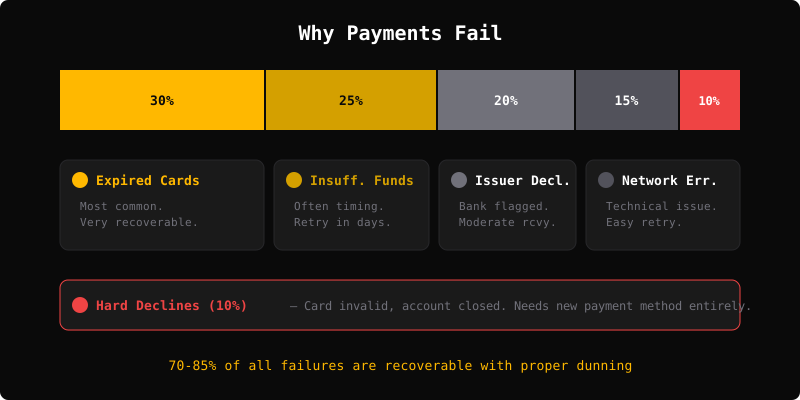
Not all payment failures are the same. The cause determines how likely recovery is:
Expired Cards (~30% of failures)
The most common and most recoverable. The subscriber's card hit its expiration date. They probably have a new card — they just haven't updated it in your system. Recovery rate: very high, if you remind them.
Insufficient Funds (~25% of failures)
The subscriber's account didn't have enough balance when you charged. This is often timing — charge hits on the 1st, paycheck arrives on the 3rd. A retry a few days later often succeeds. Recovery rate: moderate to high.
Card Declined by Issuer (~20% of failures)
The bank flagged the charge. Could be fraud protection, a new card policy, or an account issue. Sometimes a retry works. Sometimes the subscriber needs to call their bank. Recovery rate: moderate.
Network/Processing Errors (~15% of failures)
Technical issues — gateway timeouts, network errors, processor outages. These are almost always recoverable with a simple retry. Recovery rate: very high.
Hard Declines (~10% of failures)
The card is genuinely invalid — closed account, stolen card, permanent block. These won't recover with retries. The subscriber needs a completely new payment method. Recovery rate: low without subscriber action.
Understanding this breakdown matters because your dunning strategy should handle each type differently. Expired cards need a "please update your card" email. Insufficient funds need a well-timed retry. Hard declines need a direct "your payment method isn't working" message.
The Three Layers of Payment Recovery
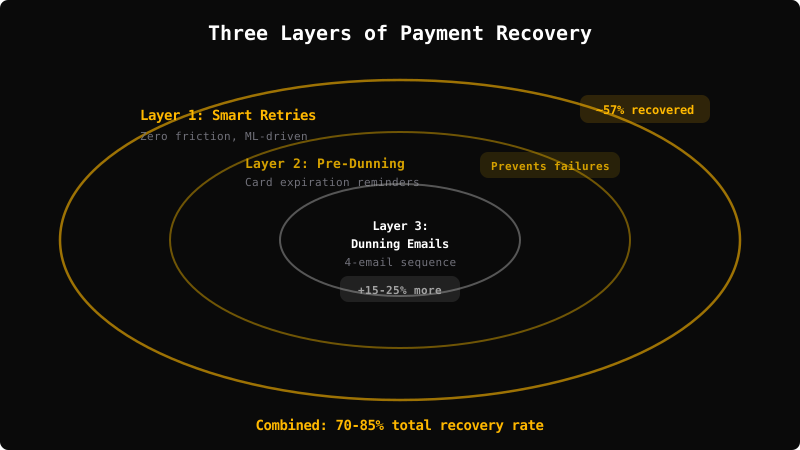
Think of dunning as three concentric layers. Each one catches failures the previous layer missed.
Layer 1: Smart Payment Retries
This is your first line of defense and recovers the most revenue with zero subscriber friction.
What it is: Instead of retrying failed payments on a fixed schedule (retry every 3 days), smart retry systems use machine learning to choose the optimal retry time based on the failure type, card issuer patterns, and historical success rates.
Stripe Smart Retries is the most widely used. It's trained on billions of transactions across the Stripe network and automatically chooses retry timing based on when similar payments have succeeded.
How to set it up:
- In Stripe Dashboard → Settings → Billing → Subscriptions and emails → Manage failed payments
- Enable Smart Retries (Stripe calls this their recommended retry schedule)
- Set retry window to at least 4 weeks (gives more attempts before giving up)
What it recovers: Stripe reports that businesses using their recovery tools reclaim an average of 57% of failed recurring payments. Smart Retries alone — without any dunning emails — handles a significant chunk.
Other platforms: Recurly has their own ML-driven retry logic. Braintree has Intelligent Payment Routing. If you're on a platform with smart retries, turn them on. If you're on a platform without them, this alone might be worth switching.
Layer 2: Pre-Dunning (Before the Failure)
The cheapest payment failure to fix is one that never happens.
Card expiration reminders are the highest-ROI tactic most subscription businesses skip entirely. When a subscriber's card is about to expire, send them an email 30 days and 7 days before asking them to update their payment method.
Pre-dunning emails have higher success rates than post-failure dunning emails. The subscriber isn't stressed about a service disruption. They're not in "my account is broken" mode. They're just updating a card — low friction, low emotion.
How to set it up:
- Stripe: Enable "Upcoming renewal" reminders in Billing settings
- Custom: Query your database for cards expiring next month, send email with direct link to billing portal
- Timing: 30 days before expiration (first reminder), 7 days before (second reminder)
What it recovers: This prevents failures entirely. A card that gets updated before expiration never triggers the dunning sequence at all.
Layer 3: Dunning Email Sequence (After the Failure)
When retries fail and the subscriber hasn't updated their payment on their own, the dunning email sequence kicks in. This is the layer most subscription businesses either skip or do badly.
The Dunning Email Sequence
Here's the exact sequence I recommend, based on what I've seen work across subscription businesses of different sizes and types.
Email 1: Day 0 (Immediately After First Failure)
Subject line: Your payment didn't go through
Purpose: Alert the subscriber and make it frictionless to fix.
What to include:
- What happened (payment failed, be specific about which subscription)
- That their access is still active (grace period)
- A direct link to update their payment method — not a link to log in, a link straight to the billing page
- No panic, no urgency. Just a helpful heads-up.
Tone: Friendly and matter-of-fact. They probably didn't even know the payment failed.
Key detail: The update payment link should bypass login if possible. Every click you add between "reading this email" and "payment updated" costs you recovery. Some platforms (Stripe Customer Portal, Chargebee self-serve) support direct billing update links.
The insider subscription playbook
One tactic that moves the needle — every Thursday
Real companies, real numbers, strategies you can steal. From the operator who grew Codecademy from $10M to $50M ARR.
Emails sent on the day of failure have the highest open and recovery rates — 41% open rate versus 27% after 30 days. Send this one immediately.
Email 2: Day 3
Subject line: Quick reminder — your payment needs updating
Purpose: Catch people who saw Email 1 and forgot, or missed it entirely.
What to include:
- Brief reminder that the payment is still unresolved
- Specific mention of what they'll lose access to if not resolved
- Same direct link to update payment
- Time remaining before service is paused
Tone: Still friendly, slightly more direct. "We don't want you to lose access."
Email 3: Day 7
Subject line: [Product Name] access ending soon
Purpose: Create gentle urgency. A week has passed — time to escalate.
What to include:
- Clear statement: if payment isn't updated by [date], their subscription will be cancelled
- Reminder of the value they've gotten ("You've [used X feature / completed Y / been a member for Z months]")
- Same direct payment update link
- Support contact if they're having trouble
Tone: Warm but direct. This is the last soft touch before the hard deadline.
Email 4: Day 12-14 (Final Notice)
Subject line: We're about to cancel your subscription
Purpose: Last chance. Loss aversion kicks in.
What to include:
- Clear deadline: "Your subscription will be cancelled on [date] if we can't process your payment"
- What they'll lose access to (be specific — data, history, team settings, whatever applies)
- One more direct payment link
- Option to reply for help
Tone: Direct, slightly urgent, but still respectful. You're not threatening — you're giving them a final opportunity.
What Happens After Email 4
If the subscriber hasn't updated their payment after 2-3 weeks of retries and 4 emails, cancel the subscription. But don't delete their account.
Keep their data. Send one more email: "Your subscription has been cancelled, but your data is saved for 30 days. Reactivate anytime." Some subscribers will come back in a few days once they notice the access is gone. Make re-subscribing as easy as clicking one link.
The Timing Framework
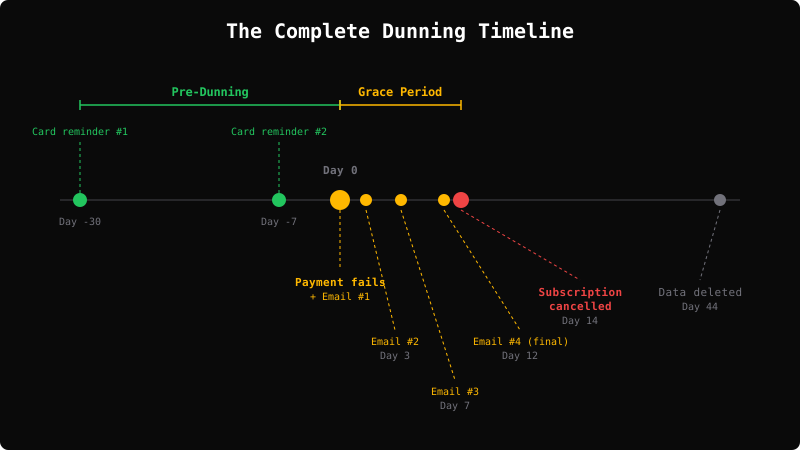
Here's how the full system works together:
Day -30: Pre-dunning — Card expiration reminder #1
Day -7:  Pre-dunning — Card expiration reminder #2
Day 0:   Payment fails → Smart Retries begin + Dunning Email #1
Day 3:   Smart Retries continue + Dunning Email #2
Day 7:   Smart Retries continue + Dunning Email #3
Day 12:  Final Dunning Email #4
Day 14:  Grace period ends → Subscription cancelled
Day 14:  "Your subscription has been cancelled" + reactivation link
Day 44:  Account data deleted (30 days after cancellation)
The specific days are adjustable. The principle isn't: start immediately, escalate gradually, give enough time for retries to work, end with a clear deadline.
What "Good" Dunning Looks Like: The Benchmarks
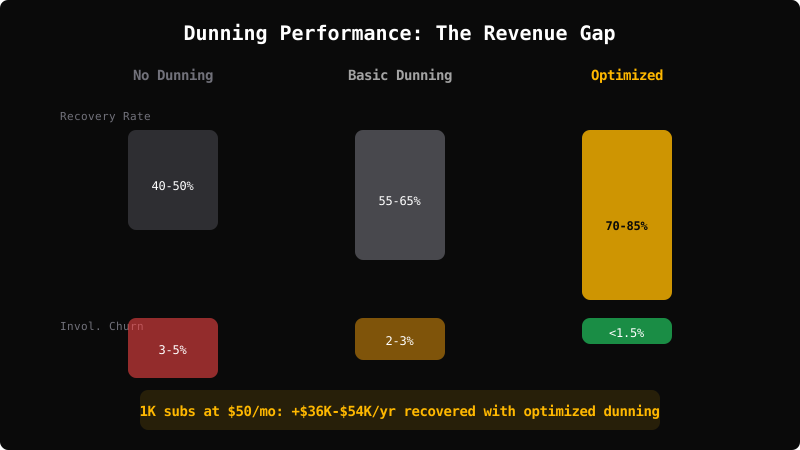
| Metric | No Dunning | Basic Dunning | Optimized |
|---|---|---|---|
| Payment recovery rate | 40-50% | 55-65% | 70-85% |
| Involuntary churn rate | 3-5% monthly | 2-3% monthly | Under 1.5% monthly |
| Revenue recovered annually (per 1K subscribers at $50/mo) | Baseline | +$18K-$30K | +$36K-$54K |
| Pre-expiration card updates | 0% | 0% (no pre-dunning) | 15-25% |
The gap between "no dunning" and "optimized" is real money. For a business with 5,000 subscribers at $50/month, optimized dunning can recover $150,000-$270,000 annually that would otherwise walk out the door. This directly improves your net revenue retention — the metric that separates subscription businesses that compound from those that grind.
Platform-Specific Setup
Stripe
Stripe has the most robust native dunning tools:
- Smart Retries: Dashboard → Settings → Billing → Manage failed payments → Use Smart Retries
- Email reminders: Enable "Send emails when payments fail" and configure the sequence
- Customer Portal: Set up the Stripe Customer Portal so subscribers can update their own payment method without contacting support
- Subscription status: Configure what happens after failed payment — set to "past_due" with a grace period before cancellation
Stripe's limitation: Their default emails are functional but generic. They work, but custom emails that match your brand voice and include personalized value reminders outperform the Stripe defaults.
App Store / Google Play
Mobile subscription businesses have less control over dunning, but the tools exist:
Apple App Store:
- Enable Grace Period in App Store Connect (6 or 16 days for annual subscriptions)
- Apple automatically retries failed payments
- You can detect billing issues via the
isInBillingRetryPeriodfield onJWSRenewalInfoDecodedPayload(App Store Server API / Notifications V2) and show in-app prompts
Google Play:
- Enable Account Hold (up to 30 days where the subscription is suspended but not cancelled)
- Google handles retries automatically
- Use the Google Play Billing Library to detect billing issues and prompt users in-app
The key for mobile: Since you can't send dunning emails directly (Apple and Google handle billing), your lever is grace periods and in-app messaging. Detect when a subscriber is in billing retry and show a gentle in-app banner.
Recurly / Chargebee / Other Platforms
Most subscription billing platforms have built-in dunning. The quality varies:
- Recurly: Strong native dunning with ML-driven retries. Configurable email templates and timing.
- Chargebee: Good dunning flows with customizable retry schedules and email sequences.
- Paddle/FastSpring (MoR platforms): Handle dunning as part of the merchant-of-record service. Less customizable but lower effort.
Whichever platform you use: turn on every recovery feature available, then supplement with custom emails for anything the platform doesn't handle well.
Advanced Dunning Tactics
Once you have the basics running, these optimizations add incremental recovery:
1. Segment by Failure Reason
Don't send the same email for an expired card and an insufficient funds decline. The subscriber's situation — and the fix — is different.
- Expired card: "Your card ending in 4242 has expired. Update to your new card →"
- Insufficient funds: You don't need to email immediately. A smart retry in 3-5 days often resolves this without bothering the subscriber.
- Hard decline: "There's an issue with your payment method. You may need a different card →"
2. In-App Notifications
Email isn't the only channel. If the subscriber is actively using your product when the payment fails, show a banner:
"There's an issue with your billing. [Update payment method →]"
This catches subscribers who don't check email often but are clearly still engaged with your product.
3. SMS for High-Value Accounts
For B2B or high-ARPU subscribers, an SMS reminder on Day 3 or Day 7 can recover accounts that ignore email. Keep it short: "Hi [Name], there's an issue with your [Product] payment. Update here: [link]"
4. Win-Back After Cancellation
Subscribers who churned involuntarily are the easiest to win back because they didn't choose to leave. After the subscription is cancelled, send a win-back sequence:
- Day 1 after cancellation: "We've cancelled your subscription, but your data is safe. Reactivate anytime: [link]"
- Day 7: "We miss you at [Product]. Your [specific data/settings] are still here. Come back: [link]"
- Day 30: "Last call — your account data will be removed in [X days]. Reactivate to keep everything: [link]"
Win-back emails for involuntary churn convert at significantly higher rates than standard re-engagement campaigns — because the subscriber didn't have a problem with your product. They had a problem with their payment method. Every recovered subscriber extends their customer lifetime value — revenue you'd already earned the right to keep.
The Dunning Email Checklist
Before you launch your dunning sequence, verify each point:
Infrastructure:
- Smart Retries enabled (Stripe, Recurly, or equivalent)
- Retry window set to at least 3-4 weeks
- Grace period configured (subscribers keep access during retries)
- Direct payment update link works without login (or with minimal friction)
- Card expiration data accessible for pre-dunning reminders
Email sequence:
- Email 1: Sent immediately on failure
- Email 2: Sent day 3
- Email 3: Sent day 7
- Email 4: Sent day 12-14
- Post-cancellation email with reactivation link
- All emails include direct payment update link
Pre-dunning:
- Card expiration reminder at 30 days before
- Card expiration reminder at 7 days before
Measurement:
- Tracking payment recovery rate
- Tracking involuntary churn rate separately from voluntary
- Tracking email open/click rates by dunning email
- Tracking win-back conversion rate
When NOT to Build a Custom Dunning Sequence
A four-email branded sequence pays off for most subscription businesses — but not all. Skip the custom build (or use the platform defaults and move on) if:
Your billing is App Store or Google Play exclusive. Apple and Google handle dunning on iOS and Android in-app purchases. You can't send emails directly to those subscribers — your tools are App Store grace periods (6 or 16 days for annual subs) and in-app messaging. Build for those channels, not a custom email sequence.
You have fewer than ~100 failed payments per month. At low volume, the four-email sequence recovers a few hundred dollars per month — likely less than the engineering and copy time costs. Use Stripe's defaults plus card expiration reminders (the highest-ROI single move) and revisit when volume justifies more.
Your ARPU is under $5/month. A 20-30% improvement in recovery on $4/month subscribers is roughly $1 per recovered subscriber. The math gets thin. Focus on conversion and retention upstream instead.
Your customer base is mostly annual prepay with no mid-year billing failures. Annual subscribers fail at renewal, not mid-cycle. A four-email mid-cycle sequence doesn't help — what matters is the 60-day-before-renewal flow plus a renewal-failure sequence.
You're pre-product-market-fit. Dunning is a leak fix. If your problem is "people don't see value before churning," fixing the involuntary leak doesn't change the trajectory. Get to PMF first; build dunning when you have a base worth protecting.
Measuring Dunning Performance
Payment Recovery Rate
Payment Recovery Rate = Recovered Failed Payments ÷ Total Failed Payments × 100
Target: 70%+ for B2B SaaS, 60%+ for B2C subscriptions.
Track this monthly. If it's below 60%, your dunning system has gaps.
Involuntary Churn Rate
Involuntary Churn Rate = Subscribers Lost to Failed Payments ÷ Total Subscribers × 100
Target: Under 1.5% monthly. If it's above 2%, dunning infrastructure needs work.
Revenue Recovered
Annualized Revenue Recovered = Active Subscribers × ARPU × Annual Payment Failure Rate × (Your Recovery Rate − Default Recovery Rate)
This is the true incremental value of your dunning system. It's the revenue you would have lost without the emails, pre-dunning reminders, and optimized retry logic.
Worked example: 5,000 subscribers × $50 ARPU × 60% × 12 (annual failure exposure) × (75% recovery − 50% default) = 5,000 × $50 × 0.05 (effective annual failure rate of 5%) × 0.25 = $31,250 in incremental annual revenue — money your dunning system created that the default would have lost.
Dunning Email Performance
Track each email in the sequence:
| Open Rate Benchmark | Recovery Attribution | |
|---|---|---|
| Email 1 (Day 0) | 40-50% | Highest — first touch catches most |
| Email 2 (Day 3) | 30-40% | Moderate — catches the forgotters |
| Email 3 (Day 7) | 25-35% | Lower — but still meaningful |
| Email 4 (Day 12) | 20-30% | Lowest — but urgency drives action |
If Email 1 has a low open rate, your subject line needs work. If open rates are fine but recovery is low, your email isn't making it easy enough to update the payment method.
FAQ
What are dunning emails?
Dunning emails are automated messages sent to subscribers when their payment fails. The term comes from "dun" — to make demands for payment. Modern dunning emails are less about demanding and more about helping: they notify subscribers of the issue and make it easy to update their payment method. A good dunning sequence includes 3-4 emails over 2 weeks, escalating from a friendly heads-up to a final cancellation warning.
How many dunning emails should I send?
Four emails over 12-14 days is the sweet spot. More than that risks annoying subscribers without meaningfully improving recovery. Fewer than that leaves money on the table — some subscribers genuinely don't see the first email. The timing matters as much as the count: day 0, day 3, day 7, and day 12-14 gives enough spacing for retries to work between emails.
What percentage of churn is involuntary?
According to Recurly's payment recovery research, involuntary churn "accounts for an estimated 20% - 40% of total churn across subscription businesses." That means up to 4 out of every 10 subscribers who "cancel" didn't choose to leave — their payment just failed. This is why fixing dunning before tackling voluntary churn is the highest-ROI move. These are subscribers who want to stay. You just need to make it easy for them.
How much revenue can dunning recover?
A well-built dunning system recovers 70-85% of failed payments, compared to 40-50% with default retry logic alone. For a subscription business with 5,000 subscribers at $50/month and a 5% payment failure rate, that gap is $75,000-$105,000 per year in recovered revenue — from subscribers who were already paying you.
Should I use Stripe's built-in dunning or build my own?
Use both. Enable Stripe's Smart Retries and email reminders as your baseline — they're good and require minimal setup. Then supplement with custom dunning emails that match your brand voice, include personalized value reminders, and have direct payment update links. The Stripe defaults are functional but generic. Custom emails outperform them because they feel like your brand, not a payment processor.
What's the difference between dunning and a win-back campaign?
Dunning happens during the grace period — the subscriber's payment failed but they haven't been cancelled yet. The goal is to recover the payment before cancellation. A win-back campaign happens after cancellation — the subscriber is gone, and you're trying to get them back. For involuntary churn, win-back campaigns convert at much higher rates than typical re-engagement because the subscriber didn't choose to leave. Both are important, but dunning comes first because prevention is cheaper than cure.
What to Do Next
If you don't have a dunning system beyond your billing platform's defaults, this is the single highest-ROI project in your subscription business right now. An afternoon of setup can recover tens of thousands in annual revenue.
Start with three things today:
- Enable Smart Retries (or your platform's equivalent)
- Set up card expiration reminders (30 days and 7 days before)
- Build a 4-email dunning sequence
Once you've fixed involuntary churn, the next step is tackling voluntary churn. For the complete playbook on customer retention strategies — including cancellation flows, annual plan incentives, and onboarding — start there.
But dunning is just one of eight places subscription businesses leak revenue. If you want to see the full picture — pricing, packaging, conversion, checkout, retention, and expansion — I built a free diagnostic for exactly that.
Take the Subscription Revenue Leak Audit →
52 checklist items across 8 revenue leak categories. Takes 10 minutes. Involuntary churn is Leak #6 — and for many businesses, it's the fastest fix on the list.

Dan Layfield
Dan ran growth at Codecademy, scaling ARR from $10M to $55M before the company was acquired for $525M. He now advises subscription businesses on pricing, retention, and revenue optimization.
Work with Dan →Related Guides
Free Trial Strategy: How to Convert Trial Users into Paid Subscribers
Most free trials fail because length is copied from competitors, not set by time-to-value. How Notion, Superhuman, Headspace, and Calm design trials that actually convert.
10 min readGrowth Ceiling: The Math That Predicts Your Maximum ARR
Your growth ceiling is the maximum subscribers your business can reach at current acquisition and churn rates. Learn the formula, benchmarks, and how to raise it.
22 min readLTV:CAC Ratio: What It Means, How to Calculate It, and What's a Good Ratio
The 3:1 LTV:CAC ratio is folklore. Here's the real benchmark by business stage, channel, and margin profile — with formulas and sourced numbers.
Get the playbook every Thursday
Weekly strategies for subscription businesses. Real companies, real numbers, tactics you can steal. From the operator who grew Codecademy from $10M to $50M ARR.