Payment Failure Recovery: Retries, Updater and Metrics
Payment failure playbook for subscriptions: decline codes, retry schedules inside Visa and Mastercard limits, card updater and a recovery dashboard.

Dan Layfield
Growth at Codecademy, $10M → $55M ARR
Most subscription teams try to fix payment failure with copywriting. They rewrite the "your payment failed" email three times while the retry logic underneath sits at whatever the processor shipped with, and nobody checks whether card account updater is even on.
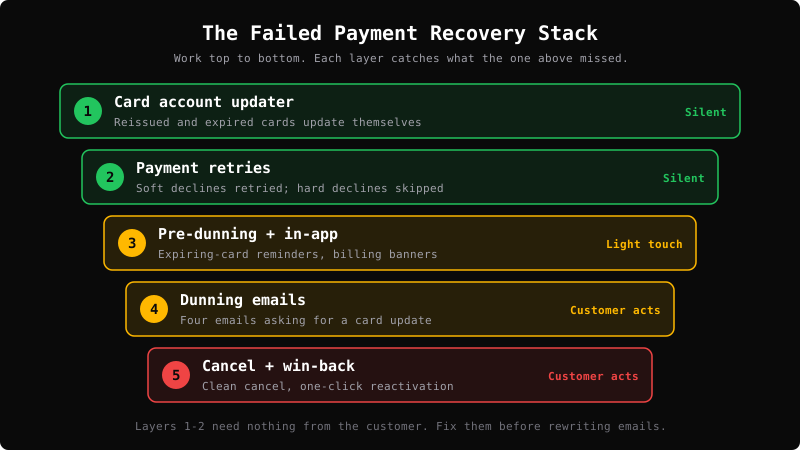
That's backwards. Failed payment recovery is a stack. The layers that don't need the customer to do anything (account updater and retries) do most of the work. Emails catch what's left. Recurly estimates involuntary churn, meaning subscribers lost to failed payments rather than a decision to leave, at 20–40% of total churn across subscription businesses. In Stripe data published by Churnkey, it was 24% of all churn for B2C businesses.
At Codecademy, where I ran growth from $10M to $55M ARR (2017-2021), payment recovery sat alongside pricing, checkout and plan mix as one of the unglamorous levers that compounded. When I look at subscription businesses now, I usually find the same three gaps: nobody knows whether updater is on, retries are on defaults, and nobody can say what last month's recovery rate was.
This guide is the operating manual: why recurring payments fail and what to do with each decline code, the recovery stack in order, a default retry schedule that stays inside card-network rules, an audit checklist, and a monthly dashboard you can download. The customer-facing emails have their own guide: Dunning Process: Emails That Recover Failed Payments.
Failed Payment Recovery at a Glance
| Layer | What it does | Needs the customer? | Who owns it |
|---|---|---|---|
| 1. Card account updater | Card networks push reissued card numbers and new expiry dates to your processor | No | Payments / billing |
| 2. Payment retries | Re-attempts the failed invoice at better times, skipping hard declines | No | Payments / billing |
| 3. Pre-dunning and in-app nudges | Card-expiring reminders; billing banners for past-due users | A little | Lifecycle / product |
| 4. Dunning emails | Timed sequence asking the customer to update their payment method | Yes | Lifecycle / CRM |
| 5. Cancel and win-back | Clean cancel and a reactivation path for those who never fixed it | Yes | Lifecycle |
The short answer: Failed payment recovery turns a declined recurring charge back into a paid invoice before the subscriber is cancelled. Work the stack in order: account updater on, retries that skip hard declines and stay inside Visa and Mastercard limits, pre-dunning and in-app prompts, then a dunning sequence for whatever's left. Track failed payment rate, recovery rate and involuntary churn monthly.
What a Failed Payment Is, and How It Becomes Involuntary Churn
A failed payment is a recurring charge that the issuing bank or card network doesn't approve. In a subscription business, a failure kicks off a lifecycle:
Charge declined → Subscription past due (grace period, access on)
  → Retries + customer messages
  → Recovered (invoice paid)  OR  Retries exhausted → Cancelled / unpaid / paused
If the invoice is never recovered, the subscriber churns involuntarily. They didn't click cancel. Their payment just stopped working. This is why involuntary churn should always be reported separately from voluntary churn (see the churn rate guide). The fixes are completely different.
Declines come in two kinds, and the difference drives everything downstream:
- Soft declines are temporary. The card is valid, but the charge failed this time: insufficient funds, "do not honor," "try again later," processing errors. These can be retried.
- Hard declines are permanent for that card: lost, stolen, closed, incorrect number, revoked authorization. Retrying won't work, and card networks charge merchants who keep retrying them. The customer has to provide a new payment method.
Why Recurring Payments Fail, and What to Do About Each
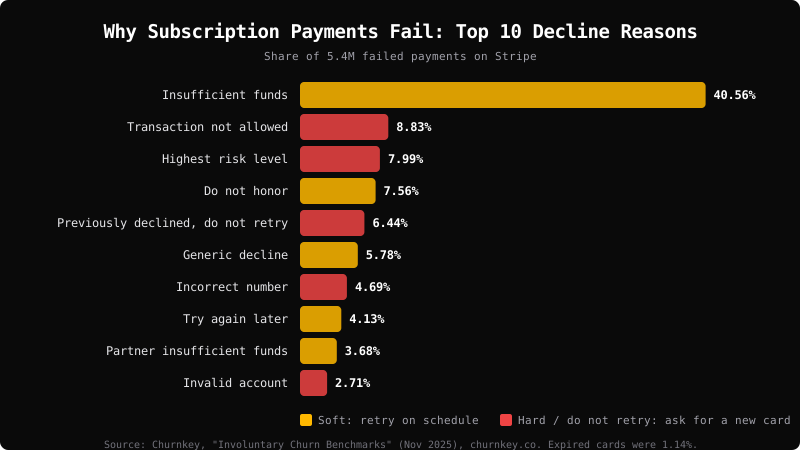
The biggest bucket by far is insufficient funds. In Churnkey's analysis of 5.4M failed payments on Stripe, published in November 2025, insufficient funds was 40.56% of failures. Expired cards were only 1.14%, which is what you'd expect when card updater is doing its job. That's one vendor's dataset, so treat the shares as directional and pull your own decline-code report before deciding where to focus.
Decline Code → Action Table
Use this as the routing table for your retry logic and your dunning copy. Codes are Stripe's; shares are from Churnkey's dataset above. "Stripe retries it?" follows Stripe's list of hard decline codes it won't retry without a new payment method.
| Decline (Stripe code) | Share of failures (Churnkey) | Type | Stripe retries it? | What to do |
|---|---|---|---|---|
Insufficient funds (insufficient_funds) |
40.56% | Soft | Yes | Retry on the schedule below. Hold the first email until the first retry fails. Use the insufficient-funds email. |
Transaction not allowed (transaction_not_allowed) |
8.83% | Hard | No | Stop. Ask for a different card or a call to the bank. |
Highest risk level (highest_risk_level) |
7.99% | Hard | No | Stop. Ask for a different payment method. |
Do not honor (do_not_honor) |
7.56% | Soft | Yes | Retry. If retries fail, email: "Your bank declined this. A different card or a quick call to your bank usually fixes it." |
| Previously declined, do not retry | 6.44% | Stop | Treat as no | Don't retry the same card. Ask for a new payment method. |
Generic decline (generic_decline) |
5.78% | Soft | Yes | Retry, then the standard dunning sequence. |
Incorrect number (incorrect_number) |
4.69% | Hard | No | Ask for the card again right away. |
Try again later (try_again_later) |
4.13% | Soft | Yes | Retry silently. No email unless retries run out. |
Expired card (expired_card) |
1.14% | Fix with new details | Only after an update | Check updater events first, then use the expired-card email. |
Lost, stolen or pickup card (lost_card, stolen_card, pickup_card) |
0.72–0.94% each | Hard | No | Ask for a new card. Don't mention "stolen" in the email. |
Authentication required (authentication_required) |
Not broken out | Needs the customer | No | Send the hosted confirmation link. Stripe can email it automatically. |
Processing error (processing_error) |
0.19% | Soft | Yes | Retry silently. Never email. |
The Recovery Stack, in Order
Layer 1: Card Account Updater
What it is. Account updater is a card-network service. When an issuer reissues a card (new number, new expiry date, closed account), it shares the update with the network, and the network passes it to merchants who have the card on file. The main programs:
- Visa Account Updater supports account number changes, new expiration dates, account closures and product or brand conversions. It's accessed through your acquirer.
- Mastercard Automatic Billing Updater (ABU) provides updated card numbers and expiry dates to registered card-on-file and recurring-billing merchants, through pull or push models.
- American Express Cardrefresher does the same for enrolled merchants with recurring billing.
How most subscription businesses get it. Through the processor, not directly. Stripe, for example, automatically attempts to update saved card details when a customer gets a new card, through the card networks. Stripe notes this is widely supported for cards issued in the United States, that international support varies by country, and that it depends on issuers participating. You can watch it working through the payment_method.automatically_updated webhook.
What it fixes, and what it doesn't. Updater handles the reissued or expired card problem, often before a charge ever fails. It does nothing for insufficient funds, issuer risk declines or a customer who has decided to leave.
What to check this week.
- Is updater enabled (or included) on your processor and every acquiring relationship you use?
- Do you receive updater events, and do they update the card on the subscription itself, not just the customer record?
- On Stripe, retries use the subscription's default payment method first. If you update a different field, Stripe keeps retrying the old card.
The insider subscription playbook
One tactic that moves the needle — every Thursday
Real companies, real numbers, strategies you can steal. From the operator who grew Codecademy from $10M to $55M ARR.
Layer 2: Payment Retries
A single immediate retry, or a flat "every 3 days," misses recoverable payments. Insufficient-funds failures recover when money arrives, not on a fixed interval. Good retry logic changes timing based on the decline type and on patterns across many merchants.
On Stripe: Smart Retries uses a model to choose retry times. For new accounts it's on by default, configured for up to 8 retries within 2 weeks. You can lengthen the window to 3 weeks, 1 month or 2 months, define a custom schedule of up to three retries, and choose what happens when retries run out: cancel, mark unpaid, leave past due, or pause. Paddle Retain works similarly: up to 7 retries, the first about 24 hours after the failure, the last around day 20.
Stay inside the card-network limits. Both networks charge merchants for excessive retries on the same card:
| Network | Retry limit on soft declines | Never retry | Source |
|---|---|---|---|
| Visa | Up to 20 attempts in a rolling 30 days since May 2025 (15 before that, and many processor docs still say 15) | Category 1 "never approve" declines, such as pickup, lost, stolen or closed account | Checkout.com, PayPal |
| Mastercard | Up to 10 attempts in 24 hours and 35 in a rolling 30 days, after which fees apply | Merchant Advice Codes 03 ("do not try again") and 21 ("payment cancellation") | Checkout.com, PayPal |
Those figures come from processor and acquirer guidance, not the network rulebooks, which aren't public. Confirm the current numbers with your acquirer. If your processor says 15 for Visa, working to 15 keeps you inside either number.
A default retry schedule. If your processor's smart retries are on, keep them. If you're setting your own schedule, this is where I'd start. It's my default, not a benchmark, and it uses 6 attempts in 14 days, well under both networks' limits:
| Attempt | Timing after the first failure | Why then |
|---|---|---|
| Retry 1 | Day 1 | Catches processing errors and temporary issuer holds |
| Retry 2 | Day 3 | Catches short-term balance and timing issues |
| Retry 3 | Day 5 | Spaces attempts so each lands on a different day for the bank |
| Retry 4 | Day 7 | Covers a weekly pay cycle |
| Retry 5 | Day 10 | Still inside the window where Recurly sees 90% of recoveries |
| Retry 6 | Day 14 | Last attempt before the final dunning notice and cancellation |
Rules that go with it: skip every hard decline and every "do not retry" response, retry immediately when the customer adds a new card, and if you extend the window for insufficient funds (for example to day 21 or 28 to cover a monthly pay cycle), add silent retries, not more emails.
What good looks like. There's no universal recovery rate, but there's useful evidence. In Churnkey's Stripe dataset, Stripe's retries alone recovered 51% of failed invoices, at an average of 5.5 days (Churnkey). In one enterprise membership retailer's data, optimized retry logic moved recovery from about 53% to about 71% on the same transactions (Recurly, April 2026). Both are vendor datasets. Use them as evidence that retry logic matters, not as your target.
Layer 3: Pre-Dunning and In-App Nudges
The cheapest failure is the one that never happens.
- Expiring-card reminders. Ask customers to update a card before it expires. Stripe can send this automatically one month before the card on file expires.
- Renewal reminders for annual plans. A heads-up before a large annual charge cuts down surprised declines and disputes.
- In-app billing banners. If a past-due subscriber opens your product, show "There's a problem with your payment. Update in one click." This catches people who never read billing emails but clearly want the product.
- Mobile. On App Store and Google Play, you don't control retries. Turn on Apple's Billing Grace Period (3, 16 or 28 days). Google now auto-calculates account hold as 60 days minus grace. Use in-app prompts during those windows.
Layer 4: Dunning Emails (Summary)
Whatever layers 1–3 don't recover needs the customer to act. That's the dunning sequence: four emails over roughly two weeks, one direct update-payment link, copy that varies by failure reason, and a clear final notice. Hard declines get an early, direct ask. Insufficient-funds failures get a softer, later first touch.
The full paste-ready sequence and setup are in Dunning Process: Emails That Recover Failed Payments.
Layer 5: Cancel Cleanly, Then Win Back
When everything's exhausted, cancel (or pause), keep the account, and make reactivation one click. Involuntary churners are the best win-back audience you have, because they never decided to leave. See win-back campaigns.
The Full-Stack Audit Checklist
Run this once a quarter, per processor. Anything unchecked is the next thing to fix.
Updater
- Account updater on for every processor and acquirer (Visa, Mastercard, Amex where supported)
- Updater events update the subscription's payment method, not just the customer record
Retries
- Smart retries on, or a custom schedule written down
- Total attempts per card inside Visa and Mastercard limits
- No retries on hard declines, Visa Category 1 or Mastercard MAC 03/21
- Immediate retry when a customer adds a new card
- End state chosen on purpose: cancel, pause or unpaid
Pre-dunning
- Expiring-card emails on
- Pre-renewal reminder for annual plans
- In-app billing banner for past-due subscribers
- Apple Billing Grace Period on; Google Play grace and account hold read from the API
Dunning
- Four-email sequence live, with failure-reason variants
- Emails sent from your own domain, not the processor's
- Sequence stops the moment payment succeeds
End state
- Account and history kept after cancellation
- Post-cancel reactivation email live, with handoff to win-back
Measurement and ownership
- Monthly dashboard (below) with a fixed recovery window
- Involuntary churn reported next to voluntary churn, never blended
- One named owner for the whole stack
How to Measure Recovery
You need three rates on the same monthly dashboard, plus one dollar figure. Define the window once and don't change it mid-year.
Failed Payment Rate
Failed Payment Rate = Failed recurring payment attempts (first attempt) ÷ Recurring payment attempts in the period × 100
Count first attempts, not retries, or the number inflates every time your retry schedule changes. If it's rising, look at customer mix, price point, geography and checkout validation before blaming retries.
Payment Recovery Rate
Payment Recovery Rate = Failed invoices paid within the recovery window ÷ Failed invoices in the period × 100
A 30-day window is a sensible default. Split it by layer if your tooling allows: recovered silently (updater and retries) versus recovered after a customer action (dunning or in-app). That split tells you which layer to work on next.
Recovered Revenue
Recovered Revenue = Sum of invoice amounts that initially failed and were paid within the window
To estimate the incremental effect of a change, compare recovery rates on similar cohorts before and after, rather than crediting every recovered dollar to the newest tactic.
Involuntary Churn Rate
Involuntary Churn Rate = Subscribers (or MRR) cancelled for non-payment in the period ÷ Subscribers (or MRR) at the start of the period × 100
Report it right next to voluntary churn. If you report MRR-based churn elsewhere, use MRR here too.
The Monthly Dashboard Template
One row per month. Fill in the inputs from your processor and billing data; the rest are calculated. Download the dashboard template (CSV) → It opens in Google Sheets or Excel with the formulas in place.
| Column | Type | Definition |
|---|---|---|
| Month | Input | Calendar month |
| Recurring attempts | Input | First-attempt recurring charges |
| Failed first attempts | Input | Of those, how many failed |
| Failed payment rate | Calculated | Failed first attempts ÷ recurring attempts |
| Failed invoices | Input | Invoices that failed at least once |
| Recovered silently | Input | Paid within 30 days without customer action (updater, retries) |
| Recovered after customer action | Input | Paid within 30 days after a card update (dunning, in-app) |
| Recovery rate | Calculated | (Silent + customer action) ÷ failed invoices |
| Recovered revenue ($) | Input | Value of invoices recovered within 30 days |
| Subscribers at start | Input | Paying subscribers on day 1 of the month |
| Cancelled for non-payment | Input | Subscriptions ended because payment failed |
| Involuntary churn rate | Calculated | Cancelled for non-payment ÷ subscribers at start |
| Voluntary churn rate | Input | From your churn report, same definition |
| Dunning emails sent | Input | All dunning emails sent in the month |
| Emails sent per recovery | Calculated | Dunning emails ÷ recoveries after customer action |
| Stack status | Input | Updater on (Y/N), retry policy, dunning version |
What's a "Healthy" Benchmark?
Published figures exist, but they're vendor datasets with their own definitions. Churnkey's State of Retention 2025 reports involuntary churn centered around 1% monthly across more than a thousand companies in 2024. Stripe data in Churnkey's benchmarks post puts B2C annual involuntary churn at 9%, against 6% for B2B. Use these to spot whether you're dramatically off, not as targets. Then trend your own numbers before and after each change. More on reading benchmarks without being misled in this post.
For a $50M+ Membership or Media Business
Put the dashboard's bolded lines on one operating-review slide, monthly, with a trailing-12-month trend, plus the stack status line. The status line is the one that gets an owner assigned.
Build vs Buy
Start with what your processor already does. On Stripe, that means account updater, Smart Retries, failed-payment and expiring-card emails, and a hosted page for updating payment details. Most post-PMF consumer businesses can get very far by configuring these properly and adding their own dunning copy.
Consider a recovery specialist when:
- Volume is high. A few points of recovery rate is meaningful money at your failed-payment volume.
- You need coverage your processor lacks. For example, SMS, in-app payment walls, multiple processors or more sophisticated retry logic.
- Nobody owns it. Paying for a tool with a success-based fee can be cheaper than the team time you'd never allocate anyway.
- You've done the basics and the numbers are still bad. Involuntary churn stays high after updater, retries and a real dunning sequence are in place.
Vendors in this space include billing platforms with recovery add-ons (Recurly, Chargebee, Paddle) and specialist tools (Churnkey, Churn Buster, Baremetrics Recover, among others). The right choice depends on your processor, volume and team. Ask any vendor three questions:
- How do you measure recovery, and is it incremental to what my processor already recovers?
- Do you retry hard declines, and how do you stay inside Visa and Mastercard limits? (The first answer should be no.)
- What happens to my retry and email settings when you're switched on? Make sure two systems aren't fighting.
FAQ
What is a payment failure in a subscription business?
A payment failure is a recurring charge that the bank or card network doesn't approve. The most common causes are insufficient funds, issuer risk declines, and expired or reissued cards. If it isn't recovered, the subscriber goes past due and is eventually cancelled involuntarily, even though they never chose to leave.
What's the difference between a soft and a hard decline?
A soft decline is temporary, like insufficient funds or "try again later," and a retry can succeed. A hard decline is permanent for that card, like a lost, stolen or closed card or an incorrect number. Don't retry hard declines. Ask the customer for a new payment method instead.
How many times can you retry a failed card payment?
Per processor and acquirer guidance, Visa allows up to 20 attempts in a rolling 30 days on retryable declines (15 before May 2025), and Mastercard charges fees after 10 attempts in 24 hours or 35 in 30 days. Neither allows retries on "do not retry" responses. Confirm current limits with your acquirer. Most subscription retry schedules need far fewer attempts than either limit.
Why do some subscription businesses see more payment failures than others?
Price point and geography. As I wrote in my voluntary vs involuntary churn benchmarks post, the cheaper your product, the more you deal with low-balance accounts and bad payment methods. Churnkey's State of Retention 2025 reports insufficient-funds declines ranging from 81% of failures in Australia to 29% in Singapore. Pull your own decline-code report by country and plan before choosing what to fix.
What is an account updater?
Account updater is a card-network service that passes new card numbers and expiry dates to merchants, usually through their processor, when a card is reissued or expires. The programs are Visa Account Updater, Mastercard Automatic Billing Updater and American Express Cardrefresher. It prevents a class of failures without asking the customer to re-enter a card. It doesn't fix insufficient funds or hard declines.
Does account updater work outside the US?
Partly. Stripe says automatic card updates are widely supported for US-issued cards, that international support varies by country, and that it depends on issuers participating. If a large share of your subscribers are outside the US, expect more expired-card failures and lean harder on expiring-card reminders.
What is a good payment recovery rate?
There's no universal number, because windows and definitions differ. In Churnkey's Stripe dataset, Stripe's retries alone recovered 51% of failed invoices. Recurly describes one membership retailer moving from about 53% to about 71% with better retry logic. Pick a fixed window, measure your own rate, and trend it after each change.
How do I calculate failed payment rate, recovered revenue and involuntary churn?
Failed payment rate = failed first-attempt recurring charges ÷ recurring charges in the period. Recovered revenue = the value of invoices that initially failed and were paid within a fixed window, such as 30 days. Involuntary churn = subscribers (or MRR) cancelled for non-payment ÷ subscribers (or MRR) at the start of the period. The dashboard template has all three.
Is failed payment recovery the same as dunning?
No. Failed payment recovery is the whole stack: account updater, retries, pre-dunning, customer messaging and the final cancel or win-back. Dunning is the customer-messaging layer of that stack. See Dunning Process: Emails That Recover Failed Payments.
What should happen when retries run out?
Choose it on purpose. Stripe lets you cancel the subscription, mark it unpaid, leave it past due or pause it when retries are exhausted. For most consumer subscriptions, I'd cancel or pause, keep the account and history, and send a one-click reactivation email. Leaving subscriptions past due indefinitely inflates your active count and hides involuntary churn.
How long should the grace period be?
Long enough to cover your retry window, so subscribers keep access while you're still recovering the payment. On the web, that's whatever your retry schedule is, typically two to four weeks. On iOS, Apple's Billing Grace Period can be set to 3, 16 or 28 days. Google Play sets grace and account hold for you.
Do we need failed payment recovery software?
Not at first. Turn on account updater and smart retries, add a real dunning sequence, and measure your recovery rate for a couple of months. Consider a specialist tool once failed-payment volume or involuntary churn stays high after those basics, or when nobody on the team can own the work.
What to Do Next
Here's the order I'd tackle it in:
- Run the audit checklist above for every processor.
- Confirm account updater is on and that updates reach the subscription's payment method.
- Fix your retry policy: the decline-code table, the schedule, and the network limits.
- Ship or fix the dunning sequence using the dunning process guide.
- Start the monthly dashboard and review it with whoever owns the stack.
Involuntary churn is one door. The other is voluntary cancellation. See cancellation flow examples and subscription metrics for the rest of the picture.
Every Thursday I send one tactic like this to people already running subscription businesses. Browse the archive or subscribe below.
If involuntary churn is a material leak and you want someone to review the full recovery stack with you (updater, retries, dunning and reporting), I do a free 30-minute call. No pitch.

Dan Layfield
Dan ran growth at Codecademy, scaling ARR from $10M to $55M before the company was acquired for $525M. He now advises subscription businesses on pricing, retention, and revenue optimization.
Work with Dan →Related Guides
Free Trial Strategy: How to Convert Trial Users into Paid Subscribers
Most free trials fail because length is copied from competitors, not set by time-to-value. How Notion, Superhuman, Headspace, and Calm design trials that actually convert.
10 min readGrowth Ceiling: The Math That Predicts Your Maximum ARR
Your growth ceiling is the maximum subscribers your business can reach at current acquisition and churn rates. Learn the formula, benchmarks, and how to raise it.
22 min readLTV:CAC Ratio: What It Means, How to Calculate It, and What's a Good Ratio
The 3:1 LTV:CAC ratio is folklore. Here's the real benchmark by business stage, channel, and margin profile — with formulas and sourced numbers.
Get the playbook every Thursday
Weekly strategies for subscription businesses. Real companies, real numbers, tactics you can steal. From the operator who grew Codecademy from $10M to $55M ARR.